Links connect the web.
A website can contain links between its own pages and links to other websites.
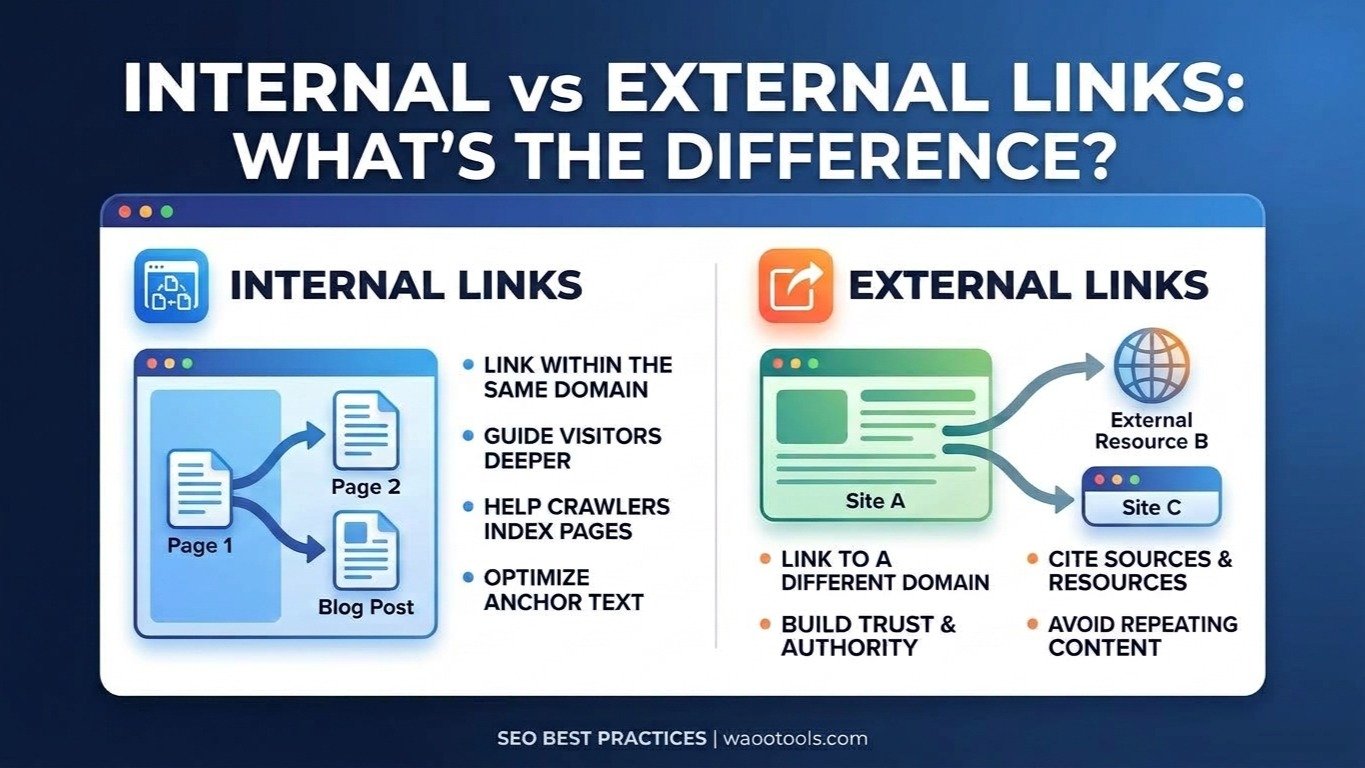
These are generally called internal links and external links.
Understanding the difference can help you improve website navigation, content structure, and link management.
What Are Internal Links?
An internal link points from one page on your website to another page on the same website.
For example:
example.com/blog/seo-guide
links to:
example.com/tools/meta-tag-generator
Both pages belong to the same website, so the link is internal.
Why Are Internal Links Useful?
Internal links help visitors move between related pages.
They can also help search engines discover pages and understand relationships between content.
For example, a blog post about technical SEO could link to your:
- SEO Audit Tool
- Broken Links Checker
- Page Speed Checker
- Meta Tag Generator
This creates a connection between your informational content and relevant tools.
Check Internal Links
The WaooTools Internal Links Checker can identify internal links found on a webpage.
Use it when reviewing:
- Blog posts
- Service pages
- Product pages
- Landing pages
- Category pages
Look for opportunities to connect related pages naturally.
What Are External Links?
An external link points from your website to another website or domain.
For example, if an article on your website links to Google's documentation, that is an external link.
External links can be useful when they provide additional information, supporting evidence, references, or useful resources.
Why Use External Links?
External links can improve the usefulness of content when they point visitors toward reliable resources.
For example, an article explaining SEO can reference official Google documentation rather than making every explanation stand alone.
A useful external link should have a reason to exist.
Do not add external links simply to increase the number of links on a page.
Check External Links
The WaooTools External Links Checker can identify external links found on a webpage.
Review the results and ask:
- Does the destination still work?
- Is the website relevant?
- Does the link provide useful information?
- Has the destination changed?
- Should the link still be present?
Internal Links vs External Links
The main difference is simple:
Link TypeDestination
Internal Link | Another page on the same website
External Link | A different website or domain
Both can have a useful role.
Internal links help organize your own content, while external links can connect your content with useful resources elsewhere on the web.
Use Descriptive Anchor Text
Anchor text is the clickable text of a link.
For example:
Poor:
Click here
Better:
Check your website's broken links
Descriptive anchor text gives users more information about where the link leads.
The wording should still feel natural.
Do not repeat the same keyword unnaturally across every link.
Avoid Overlinking
More links do not automatically make a page better.
A page containing hundreds of unrelated links can become difficult to use.
Instead, focus on links that help the reader continue their journey.
For example, if you write an article about website speed, a link to a page speed checker makes sense.
A link to an unrelated password tool probably does not.
Check Your Total Link Count
Sometimes it is useful to understand how many links a page contains.
The WaooTools Website Links Count Checker can show the total number of links and separate internal and external links.
This can be useful during technical SEO reviews and website structure checks.
How to Build a Better Internal Linking Structure
Start by identifying your most important pages.
For WaooTools, these might include major tool categories and individual tools.
Then create logical connections.
For example:
SEO Audit article
→ SEO Audit Tool
→ Meta Tag Generator
→ Broken Links Checker
→ Internal Links Checker
Another article about backlinks can connect to:
Backlink Generator
→ Backlink Checker
→ Referring Domains Checker
→ Backlink Anchor Text Checker
This creates a network of related content instead of isolated pages.
Use External Links Carefully
External links should lead to useful destinations.
Good examples include:
- Official documentation
- Government websites
- Research sources
- Recognized industry resources
- Original data sources
For SEO-related topics, Google Search Central is an appropriate reference for Google's own documentation.
Final Thoughts
Internal and external links serve different purposes, but both are useful parts of a well-structured website.
Use internal links to connect related pages on your own site.
Use external links when another website provides useful information that supports your content.
Most importantly, build links for people first. A clear and useful link structure makes your website easier to navigate and easier to maintain.